

Specification for the Xiaomi WiFi Range Extender N300
Technical Specifications
- Product Model: RD10/RD10M
- Dimensions: 80x54x70mm
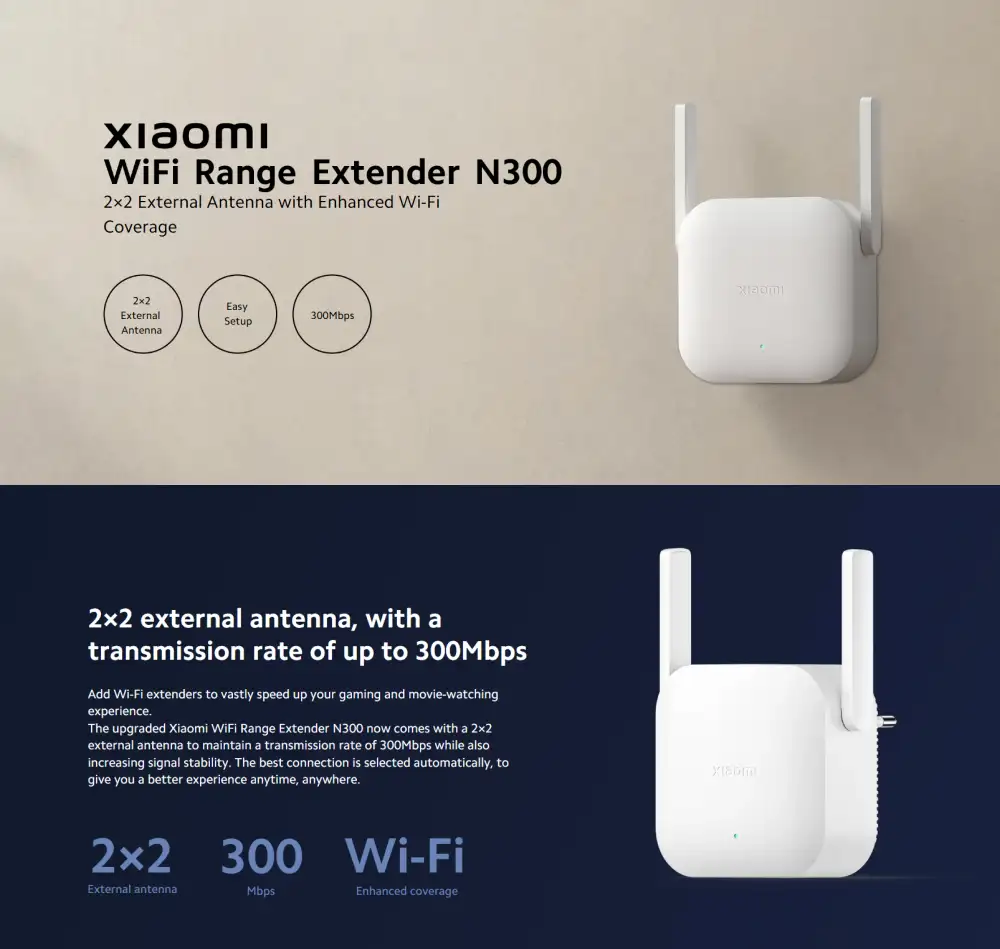
- Antenna Type: 2 external antennas
- Wireless Standards: IEEE 802.11b/g/n
- Signal Rate: 2.4GHz, up to 300Mbps
- Wireless Security: WPA-PSK/WPA2-PSK encryption
- Power Supply: 100-240V/0.35A
Xiaomi RD10M N300 300MBPS Wi-Fi Range Extender in Bangladesh
The Xiaomi RD10M N300 300Mbps Wi-Fi Range Extender is painstakingly engineered to transform your home networking experience. Say goodbye to Wi-Fi dead zones and inconsistent connections with Xiaomi RD10M N300 sophisticated extender, which integrates seamlessly with your current router and requires no complicated configuration for dependable Wi-Fi extension. Whether you’re streaming HD films, gaming online, or working from home, Xiaomi RD10M N300 extension provides a consistent, high-speed connection across your home. The Xiaomi RD10M uses 2×2 external antennas to increase signal strength and cover previously unreachable places. With its improved coverage, you can enjoy seamless communication throughout your house, from the cellar to the attic. Experience lightning-fast performance with a transmission rate of 300Mbps, which can accommodate many devices at once. Xiaomi RD10M N300 extender provides seamless and consistent access without lag or buffering, whether you’re surfing the web, streaming content, or participating in video conferences. The Xiaomi RD10M is a flexible solution for all of your smart home needs, since it supports up to 16 devices. Connect smartphones, tablets, computers, smart TVs, and more with ease, and enjoy smooth connection across all of your devices. Security is critical, and the Xiaomi RD10M provides piece of mind with WPA-PSK/WPA2-PSK encryption, which protects your network from illegal access and safeguards your data and privacy. Upgrade your home network with the Xiaomi RD10M N300 300Mbps WiFi Range Extender for better coverage, faster performance, and dependable connectivity across your house. Say welcome to a smooth and hassle-free internet experience for all of your online transactions.
What is the price of Xiaomi RD10M N300 300MBPS WiFi Range Extender in Bangladesh?
1. What is the Xiaomi RD10M N300?
The Xiaomi RD10M N300 is a Wi-Fi range extender designed to enhance and extend the coverage of your existing wireless network.
2. How fast is the Wi-Fi speed with this extender?
It provides speeds of up to 300Mbps on the 2.4GHz band.
3. What wireless standards are supported?
It supports IEEE 802.11b/g/n wireless standards.
4. How many devices can be connected at once?
It can support up to 16 devices simultaneously.
5. What type of security does the extender provide?
The extender uses WPA-PSK/WPA2-PSK encryption for secure wireless connections.
6. What are the physical dimensions of the extender?
The dimensions are 80mm x 54mm x 70mm.
7. How many antennas does the extender have?
It has two external antennas.
8. What is the power supply requirement?
The power supply requirement is 100-240V/0.35A.
9. Is the Xiaomi RD10M N300 easy to set up?
Yes, it is designed for easy setup with minimal configuration.
10. Can this extender work with any router?
Yes, it is compatible with most routers that support IEEE 802.11b/g/n.
11. Can the extender handle streaming and gaming?
Yes, it supports smooth streaming and online gaming due to its 300Mbps speed.
12. Where is the best place to position the extender?
Position it midway between your router and the area where you need better coverage.
13. Does it require special software for setup?
No, you can set it up through a web interface or mobile app without needing special software.
14. Is this extender suitable for office use?
Yes, it is ideal for work-from-home environments, providing reliable connectivity for professional tasks.
15. What is the current price of the Xiaomi RD10M N300 in Bangladesh?
The price is 1,799৳.
16. Where can I purchase the Xiaomi RD10M N300?
You can buy it from our website or visit one of our showrooms.
17. Is the extender designed for indoor or outdoor use?
It is designed for indoor use only.
18. Does the Xiaomi RD10M N300 support dual-band Wi-Fi?
No, it supports only the 2.4GHz band.
19. What should I do if the extender isn’t working properly?
Ensure proper placement, check the connection, and refer to the user manual for troubleshooting.
20. Can multiple extenders be used together?
Yes, using multiple extenders can further improve coverage in larger areas.
21. How does the extender improve my Wi-Fi coverage?
It uses two external antennas to boost signal strength and extend coverage to previously unreachable areas.
22. What should I do if I experience slow speeds with the extender?
Check for interference, ensure correct placement, and verify that your router is functioning properly.
23. How does the extender connect to my existing network?
It connects wirelessly to your router and repeats the signal to extend coverage.
24. Can I use the Xiaomi RD10M N300 with a modem?
Yes, as long as the modem is connected to a router that supports IEEE 802.11b/g/n.
25. Is the Xiaomi RD10M N300 compatible with mesh networks?
No, it is not a mesh system but can extend the coverage of your existing network.
26. Does the extender support IPv6?
The extender primarily supports IPv4. For specific IPv6 needs, check the product specifications or consult support.
27. How do I reset the Xiaomi RD10M N300?
To reset, press and hold the reset button (usually located on the device) for about 10 seconds until the LED indicators blink.
28. Can the extender be wall-mounted?
Yes, the extender is designed to be compact and can be easily plugged into a wall outlet.
29. How can I check if the extender is functioning correctly?
Check the LED indicators on the device to ensure it is powered on and connected properly.
30. Can the extender be used with a 5GHz network?
No, it supports only the 2.4GHz frequency band.
31. What should I do if the extender does not appear in the list of available networks?
Ensure the extender is powered on and within range of your router. Restart the extender and check again.
32. Can I change the extender’s network name (SSID)?
Yes, you can change the SSID through the extender’s web interface or mobile app.
33. How does the extender handle interference from other devices?
The extender operates on the 2.4GHz band, which is shared with many devices. Minimize interference by placing the extender away from other electronics.
34. Can I connect wired devices to the Xiaomi RD10M N300?
No, the extender does not have Ethernet ports for wired connections.
35. How often should I update the extender’s firmware?
Check for firmware updates periodically to ensure you have the latest features and security improvements.
36. How long is the warranty for the Xiaomi RD10M N300?
Warranty details vary by region and retailer. Check with the seller or manufacturer for specific warranty information.
37. Can the extender be used in a business environment?
Yes, it can be used in small business environments to extend Wi-Fi coverage.
38. Does the extender have a user manual?
Yes, a user manual is included with the product or available online for download.
39. How can I contact customer support for the Xiaomi RD10M N300?
Customer support details can be found on the Xiaomi website or by contacting the retailer where you purchased the product.
40. Can the Xiaomi RD10M N300 be used with smart home devices?
Yes, it can extend coverage for various smart home devices such as smart speakers, lights, and cameras.
41. What is the maximum range of the Xiaomi RD10M N300?
The range depends on factors like placement and environmental obstacles but generally extends coverage to areas previously out of reach.
42. Does the extender support QoS (Quality of Service)?
The Xiaomi RD10M N300 does not specifically support QoS features. For advanced traffic management, consider other networking solutions.
43. How can I ensure the best performance from the extender?
Place the extender in an optimal location, keep it away from large metal objects and electronic devices, and make sure your router is functioning properly.
44. Can the extender be used with a VPN?
The extender itself does not provide VPN functionality. VPNs should be configured on the devices connected to the network.
45. What should I do if the Wi-Fi signal from the extender is weak?
Adjust the placement of the extender to improve signal strength and check for potential sources of interference.
Reviews
There are no reviews yet.